Trending
New AI method can support real-time management of infectious diseases is trending now Katsina Government Opens New Diphtheria Isolation, Treatment Centre is trending now Role of ethics education in accounting fraud prevention is trending now Even ancient bacteria possessed intercellular communication structures like humans today,… is trending now NASA inaugurates first telescope named after female scientist is trending now Salah's successor arrives at Anfield: Liverpool sign Barcola in a historic deal is trending now Aston Villa vs Arsenal: Shearer predicts Monday’s EPL fixture is trending now Man City agree £65m deal for Everton's Ndiaye is trending now Barcelona's comeback against Rayo Vallecano reminds Real Madrid of a painful past is trending now Ikogosi Resort partners AFRIMMA to promote Nigeria’s tourism is trending now Mindustry Conference Partners Warner Music Africa/Africori For Fifth Edition, Opens Regis… is trending now BBNaija S11: Aikou, Flora Risk Losing Gambit Status is trending now New AI method can support real-time management of infectious diseases is trending now Katsina Government Opens New Diphtheria Isolation, Treatment Centre is trending now Role of ethics education in accounting fraud prevention is trending now Even ancient bacteria possessed intercellular communication structures like humans today,… is trending now NASA inaugurates first telescope named after female scientist is trending now Salah's successor arrives at Anfield: Liverpool sign Barcola in a historic deal is trending now Aston Villa vs Arsenal: Shearer predicts Monday’s EPL fixture is trending now Man City agree £65m deal for Everton's Ndiaye is trending now Barcelona's comeback against Rayo Vallecano reminds Real Madrid of a painful past is trending now Ikogosi Resort partners AFRIMMA to promote Nigeria’s tourism is trending now Mindustry Conference Partners Warner Music Africa/Africori For Fifth Edition, Opens Regis… is trending now BBNaija S11: Aikou, Flora Risk Losing Gambit Status is trending now
Apple

How to leave an iMessage group text on iOS

How to leave an iMessage group text on iOS

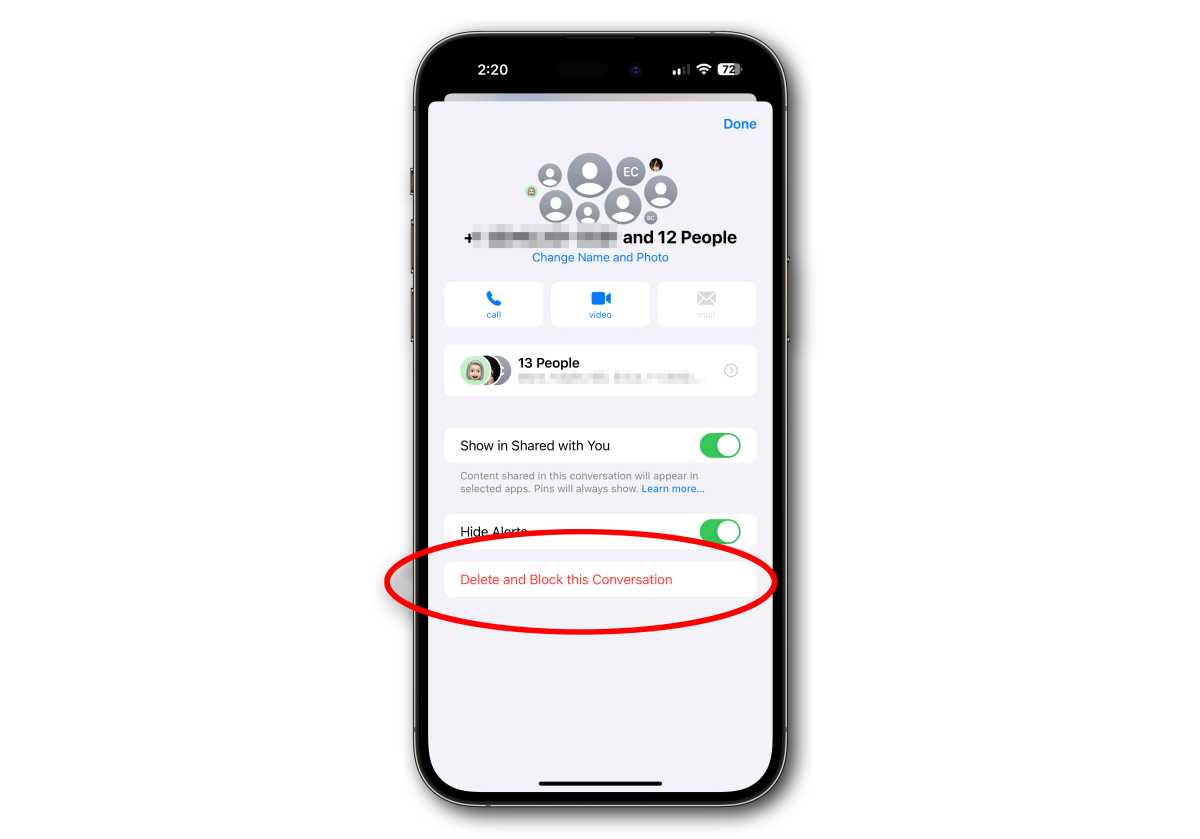
Macworld Quick show of hands: How many of you have gotten stuck in a multi-person iMessage session that caused your phone to go “buzz” every five seconds?  Yep. We’ve all been there. In the old days, in order to escape the constant buzzing, you had to turn on iOS’s system-wide Do Not Disturb feature or switch off all notifications for the Messages app. Now, it’s easy enough to just leave the group chat or silence it. Steps to Leave iMessage Group Chat on iPhone Open the Messages app. Tap the group conversation you want to leave. Tap the group name at the top of the conversation. Scroll down and tap Leave This Conversation or Delete and Block This Conversation. Foundry Foundry Foundry Blocked conversations are moved to the Recently Deleted folder, where you can recover them. Silence a group chat without leaving it On the same screen you’ll see an option to Hide Alerts. Just toggle that off if you want to stay in the conversation but don’t want to get any more notifications. You can also silence a Messages thread from the main Messages screen (group text or not): Open the Messages app. Locate the conversation you want to silence and swipe left…but not too far or you’ll delete it. Tap the bell icon to silence that message thread. Foundry Foundry Foundry iOS, iPhone

View original source →

Related

More from Macworld