
AWS EC2 RDP manter ligado
 Limon Tec
·
·
710 views
Limon Tec
·
·
710 views

Para manter o RDP de sua máquina na AWS EC2 é necessário desabilitar o Timeout de Sessões RDP.Configure as polÃticas de grupo para evitar que a sessão RDP seja encerrada.1. Abra o Editor de PolÃticas de Grupo:   Pressione Win + R, digite gpedit.msc e pressione Enter.2. Navegue até: [Computer Configuration -> Administrative Templates -> Windows Components -> Remote Desktop Services -> Remote Desktop Session Host -> Session Time Limits]3. Configure as seguintes polÃticas:   "Set time limit for disconnected sessions" -> Enabled -> Never.   "Set time limit for active but idle Remote Desktop Services sessions" -> Enabled -> Never.   "Set time limit for active Remote Desktop Services sessions" -> Disabled   "End session when time limits are reached" -> DisabledReinicie a máquina para aplicar as configurações.
 Small Business Trends
  The Register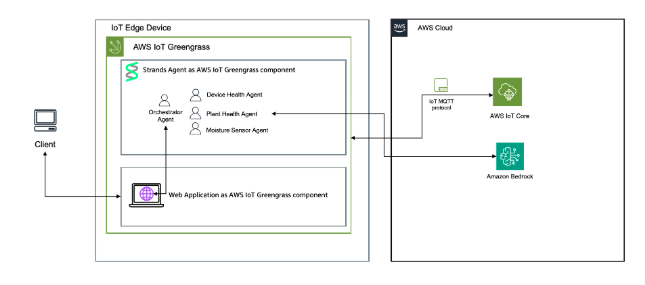
 Amazon Web Services » The Internet of Things
  Capital Numbers
 Geshan's Blog


![[NVR caseiro] Como gravar remotamente câmeras IP chinesas em PC antigo](https://blogger.googleusercontent.com/img/b/R29vZ2xl/AVvXsEiAEon5QrbhubUIuQs_vfhjhiE1iwFFTqTDcmGGDlqcRINVWhihW5i7q5yE7bwVZvOjO8GWlVzuFvfGf7G9oXmOR2XjNJPJHbWwcvJYUoX2w6HhwIMwRnI5cWSr4yD6QlE9US_xjoR3ND5jVOcvaV2OBNBdTVDDT6XvaRTXQCH408bJWmpvEWEewUHgnuX7/s320/lightnvr-tailscale.png)
