Trending
WHO Begins Trial for Ebola Outbreak is trending now Prioritise Kidney Health, Expert Urges Nigerians Amid Rising Cases is trending now Declining HIV funding threatens decades of progress, advocates warn – FRCN HQ is trending now Oil droplets remodel themselves, swallow their surroundings like living cells is trending now Unusual metal oxide shows signs of magnetism under lattice strain in ultrathin layers is trending now How molecular tethers and asynchronous replication drive parasite proliferation is trending now Here’s how engineers plan to save the satellite sent to save NASA’s Swift mission is trending now The impossible draws near! Vinicius facing the biggest offer in Arsenal's history is trending now Commonwealth Games: Nigeria’s Ogazi wins 400m gold medal is trending now Transfer news LIVE: Arsenal medical, Vinicius agreement; Man Utd shock bid is trending now Mbeumo wins Man of the Match v Atleti is trending now Desmond Elliot Returns to Movie Set After Losing APC Primary Election, Picture Elicits Re… is trending now WHO Begins Trial for Ebola Outbreak is trending now Prioritise Kidney Health, Expert Urges Nigerians Amid Rising Cases is trending now Declining HIV funding threatens decades of progress, advocates warn – FRCN HQ is trending now Oil droplets remodel themselves, swallow their surroundings like living cells is trending now Unusual metal oxide shows signs of magnetism under lattice strain in ultrathin layers is trending now How molecular tethers and asynchronous replication drive parasite proliferation is trending now Here’s how engineers plan to save the satellite sent to save NASA’s Swift mission is trending now The impossible draws near! Vinicius facing the biggest offer in Arsenal's history is trending now Commonwealth Games: Nigeria’s Ogazi wins 400m gold medal is trending now Transfer news LIVE: Arsenal medical, Vinicius agreement; Man Utd shock bid is trending now Mbeumo wins Man of the Match v Atleti is trending now Desmond Elliot Returns to Movie Set After Losing APC Primary Election, Picture Elicits Re… is trending now
Trucking

How to Make Microsoft Edge Automatically Clear Data

How to Make Microsoft Edge Automatically Clear Data

Like every other web browser, Microsoft Edge stores your browsing data to provide a better experience. When you visit websites using Edge, it saves cookies, browsing history, passwords, and other data. If you’re privacy conscious, you can manually delete the Microsoft Edge data, but what if you use a public or shared computer and don’t […] The post How to Make Microsoft Edge Automatically Clear Data appeared first on TechViral.

Like every other web browser, Microsoft Edge stores your browsing data to provide a better experience. When you visit websites using Edge, it saves cookies, browsing history, passwords, and other data.

If you’re privacy conscious, you can manually delete the Microsoft Edge data, but what if you use a public or shared computer and don’t want the browsing data saved at all?

While you can’t prevent Microsoft Edge from saving your browsing data unless you use the InPrivate mode, a workaround reduces the hassle of manually deleting the stored data.

How to Make Microsoft Edge Automatically Clear Data

There’s an option in the Microsoft Edge browser that automatically clears cookies and other stored data every time you close the browser. You need to make a few changes to the Settings. Here’s what you need to do.

1. To get started, launch the Microsoft Edge browser on your computer.

2. When the browser opens, click the three dots at the top right corner and select Settings.
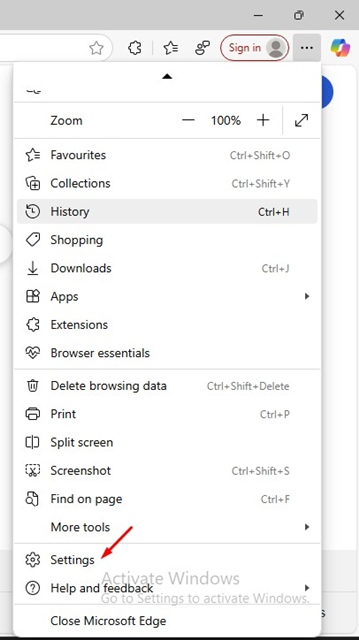
Settings

3. On Settings, switch to Privacy, Search, and Services.
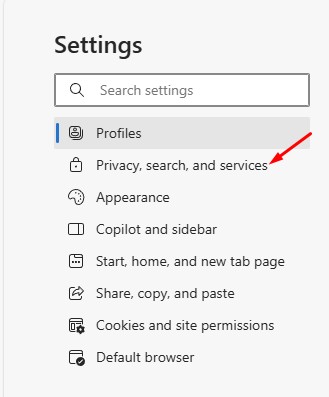
Privacy, Search, and Services

4. On the right side, scroll down to the Delete Browsing Data section.

5. Next, click the Choose what to clear every time you close the browser.
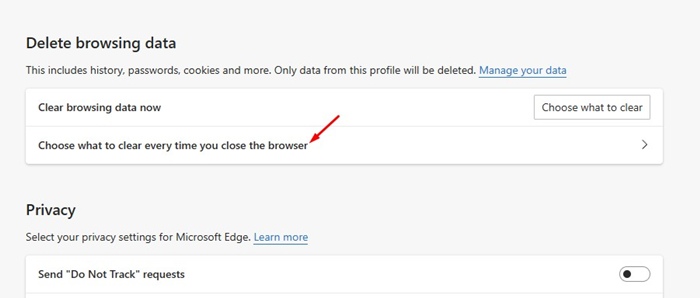
Choose what to clear every time you close the browser

6. Toggle on the items you want to clear every time you close the browser.
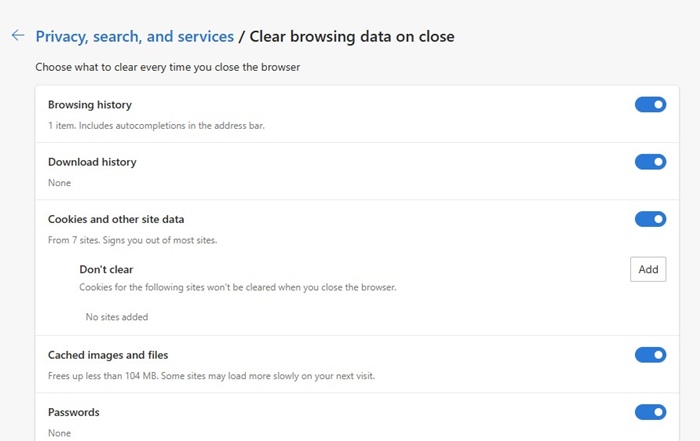
Toggle on the items

7. If you don’t want Microsoft Edge to clear data from a specific website, click the Add button and add the website’s URL.
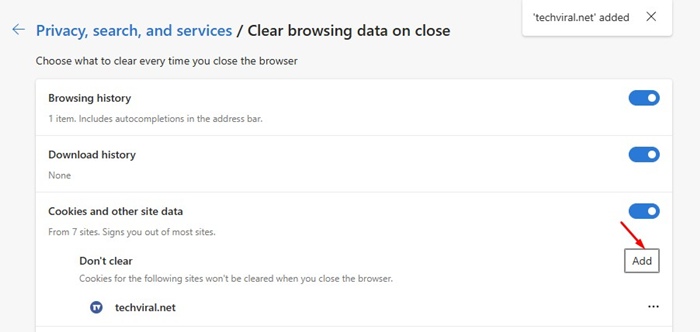
Add

The selected data will be automatically cleared the next time you close the web browser.

Clearing the browsing data from time to time is a great way to stay private. Even if you don’t want Microsoft Edge to automatically clear the browser data, you can manually clear it from the three dots (Edge Menu) > Delete Browsing Data.
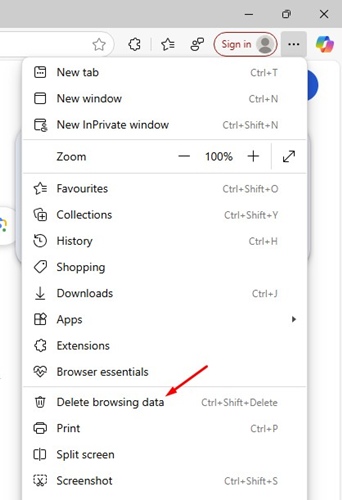
Delete Browsing Data

This guide explains how to make Microsoft Edge Automatically clear your saved data. Let us know if you need more help on this topic in the comments. Also, if you find this guide helpful, don’t forget to share it with your friends.

The post How to Make Microsoft Edge Automatically Clear Data appeared first on TechViral.
View original source →

Related