
Compare Zoom Phone pricing, features, and the different plans they offer with other top cloud PBX options on the market. The post Zoom Phone Pricing: How Much Does It Really Cost in 2026? appeared first on Nextiva Blog.
Zoom has grown far beyond its video capabilities. With the introduction of Zoom Phone, the company successfully integrated a business phone system into the app you use for video conferencing and team chats. While the user interface is familiar, Zoom Phone’s pricing has become quite complex with the platform’s shift to a cloud-based, AI-powered ecosystem.
Before deciding to migrate, you should understand the intricacies of Zoom’s VoIP service, from pay-as-you-go licenses and unlimited regional plans to the newer Phone + Workplace packages. This guide explains Zoom Phone’s pricing, including the true costs and hidden fees that can catch businesses off guard at checkout, and explores a better, unified alternative.
Zoom Phone Pricing & Plans Overview
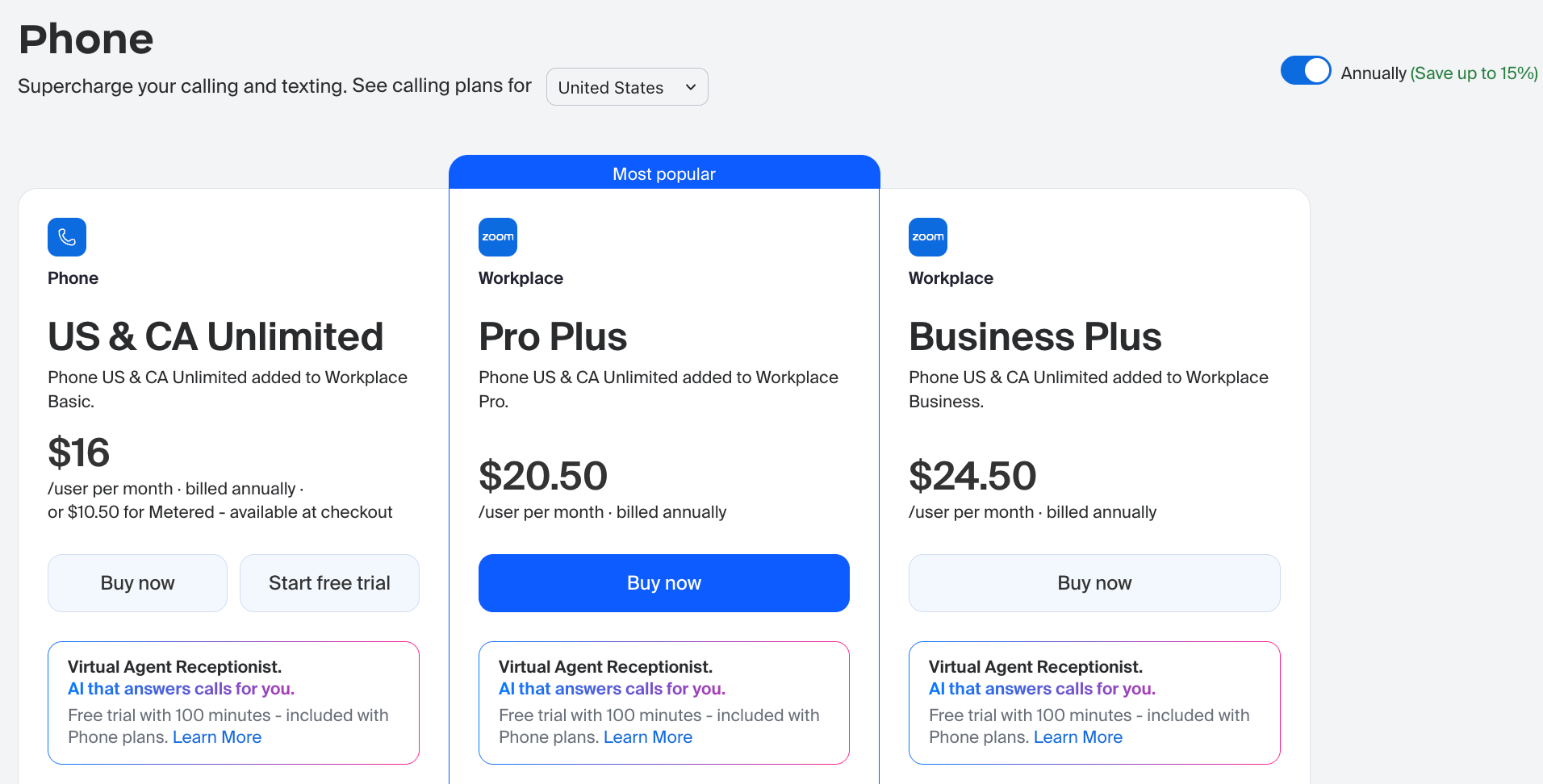
In 2026, Zoom provides two primary ways to buy: Standalone Phone Service (for those who only need a dialer) and Workplace Bundles (which weave in advanced video, AI, and document collaboration tools).
| Plan | Starting price (billed annually) | Key offering | Best for |
|---|---|---|---|
| US & Canada Metered | $10.50/user/month | Pay-as-you-go outbound calling | Startups with low outbound traffic volumes |
| US & Canada Unlimited | $16.00/user/month | Unlimited regional voice, basic AI tools | Office teams focused on domestic phone loops |
| Workplace Pro Plus | $20.50/user/month | Unlimited phone + Workplace Pro tools | Hybrid teams wanting advanced AI summaries |
| Global Select | $20.00/user/month | Unlimited calling in 1 of 48 countries | Multinational offices with local regional needs |
| Workplace Business Plus | $24.50/user/month | Premium Workplace tools + SSO access | Mid-sized firms scaling compliance profiles |
Breakdown of Standalone Zoom Phone Plans
Below you can see a breakdown of the standalone Zoom Phone plans:
1) US & Canada Metered
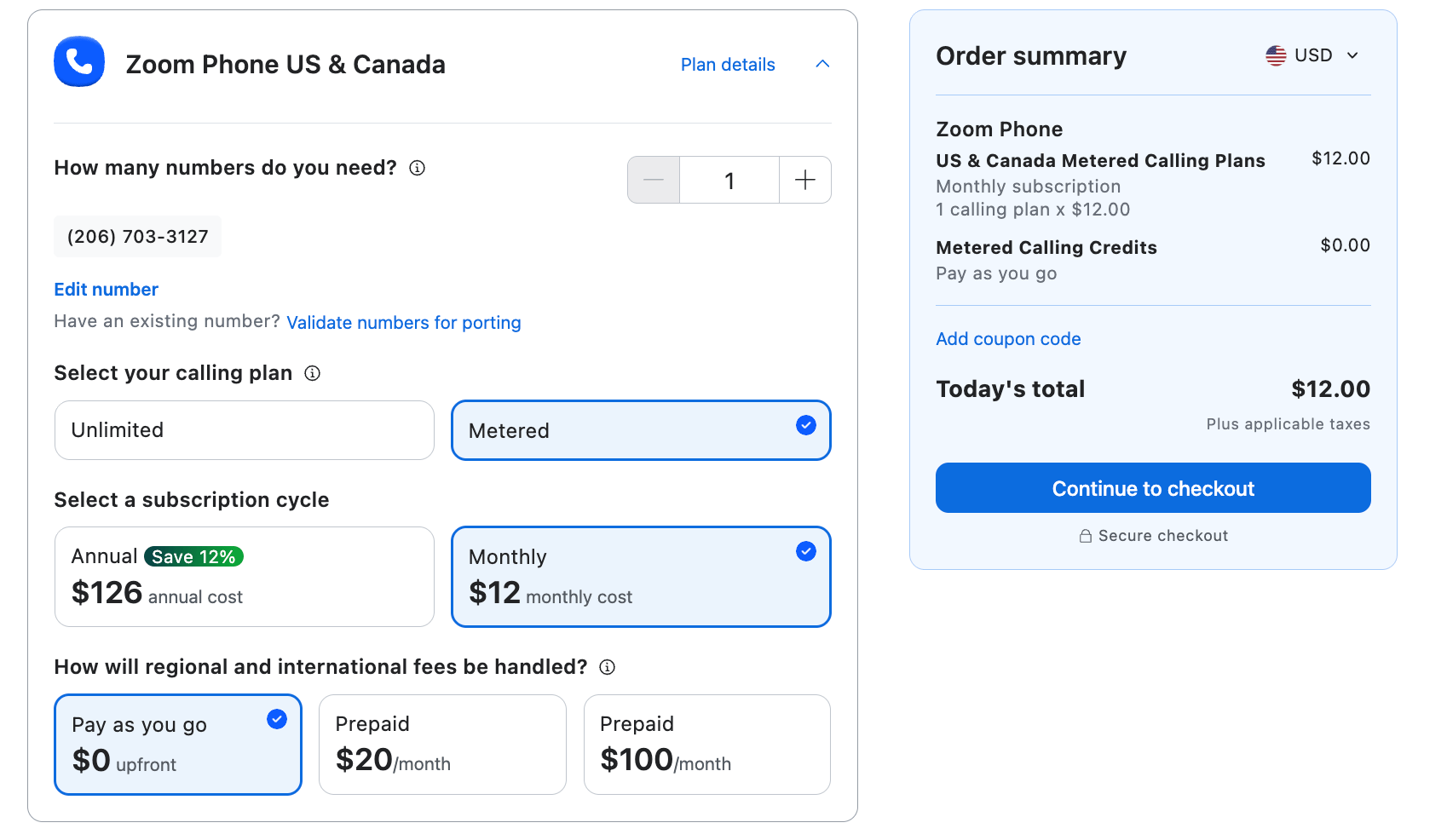
At $10.50 per user per month (or $12 month-to-month), this is a highly accessible entry point into cloud telephony. However, it’s fundamentally a passive plan. While you get a standard suite of internal call-handling tools — including basic auto-attendants, IVR routing trees, and voicemail logging — every outbound call to the Public Switched Telephone Network (PSTN) is billed on a pay-as-you-go basis.
Outbound regional rates hover around $0.03 per minute. If an employee makes more than 180 minutes of outbound calls within a single month, this tier automatically becomes more expensive than the Unlimited plan. This plan is best suited for common area endpoints (such as lobbies, warehouse halls, or break rooms) or for specialized staff who exclusively handle incoming customer traffic.
2) US & Canada Unlimited
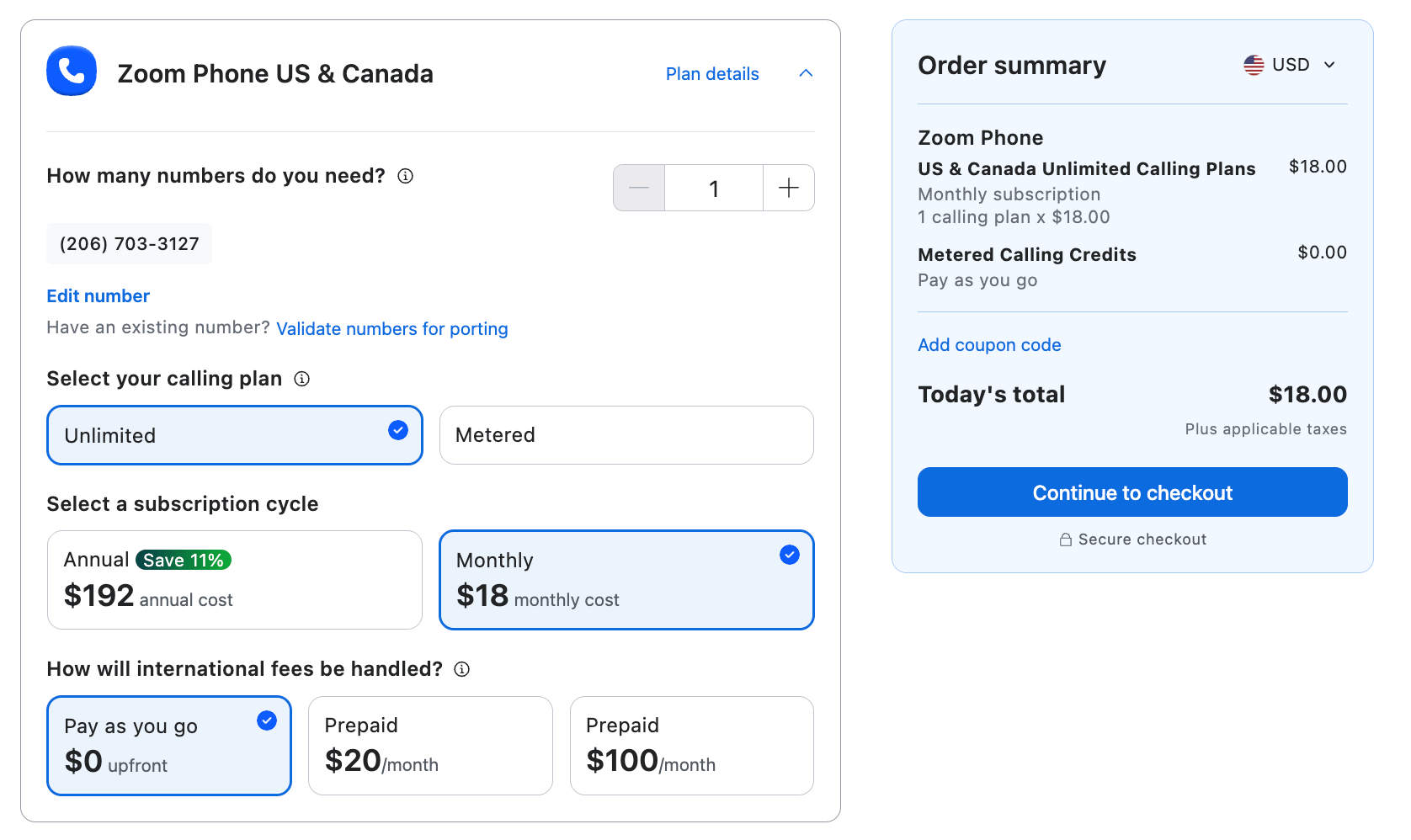
For $16 per user per month (or $18 month-to-month), this plan removes the volatility of variable minute billing and stands as the default choice for domestic small businesses. Beyond unlimited calling paths, this tier introduces more robust call queue management profiles and multi-level auto-attendant customization to streamline your company workflows.
Notably, Zoom now bakes basic AI Companion features (such as post-call summaries, task extraction, and voicemail prioritization) alongside a 40-minute limit on multi-party video meetings directly into this standalone tier. This is also the lowest tier where you can attach the Unlimited International Calling bundle ($10/month), giving you flat-rate access to 19 major global business regions, and use Bring Your Own Carrier (BYOC) routing.
3) Global Select Plan
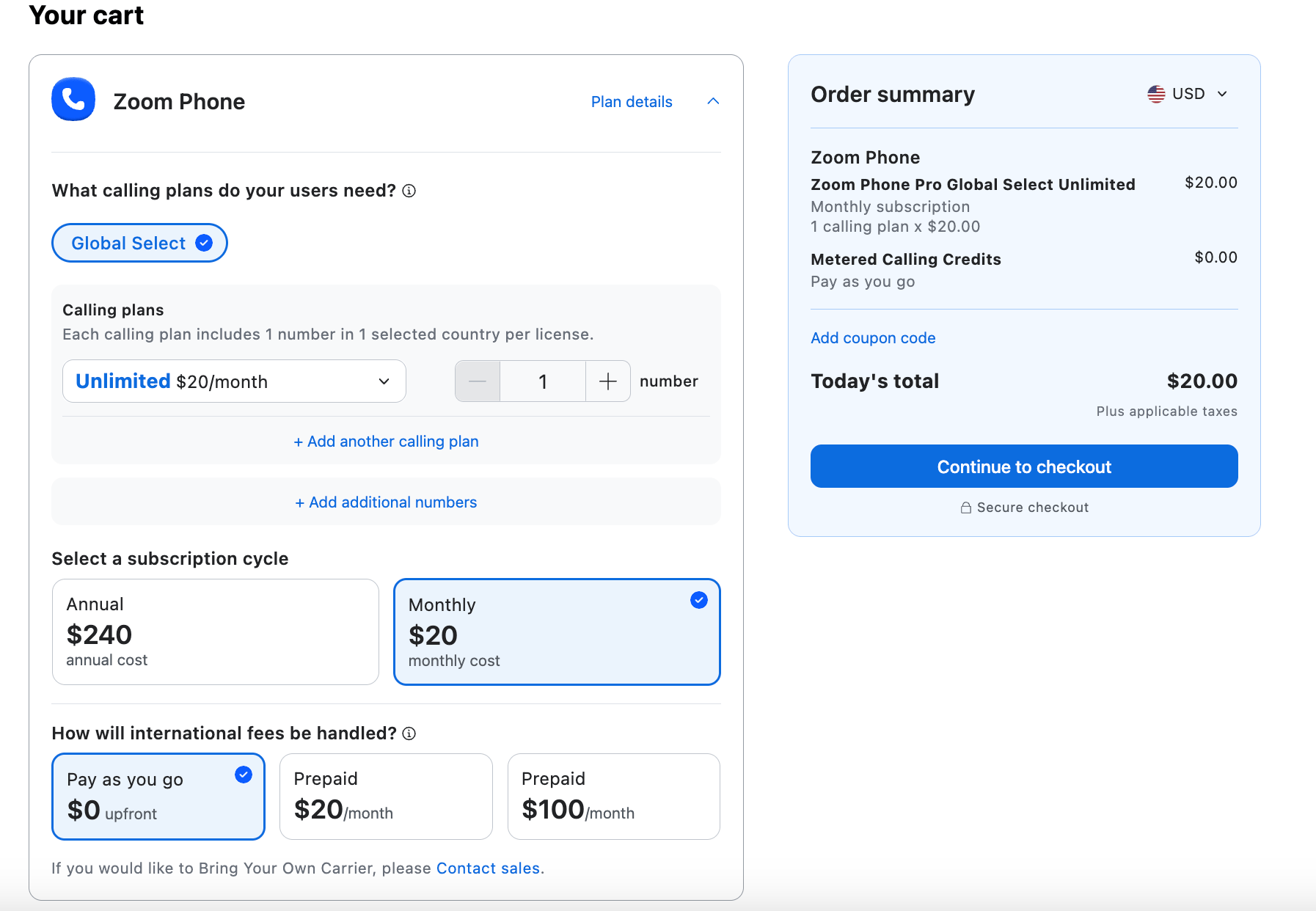
The Global Select plan at $20 per user, per month (or $25 month-to-month) solves the administrative headache of establishing international numbers. It allows you to select one of 48 supported countries to serve as your local calling zone, completely bypassing regional carrier setups.
- DID service utility: It provisions a direct inward dial number, allowing international clients in your targeted country to reach your team at local rates while you manage the call from any global desk app.
- Compliance automation: Zoom completely manages the complex local regulatory and tax requirements for these 48 nations, shifting a heavy operational burden away from your internal IT team.
Breakdown of Workplace + Phone Bundles
Zoom encourages businesses to purchase Phone as part of the following Zoom Workplace bundles:
4) Workplace Pro Plus
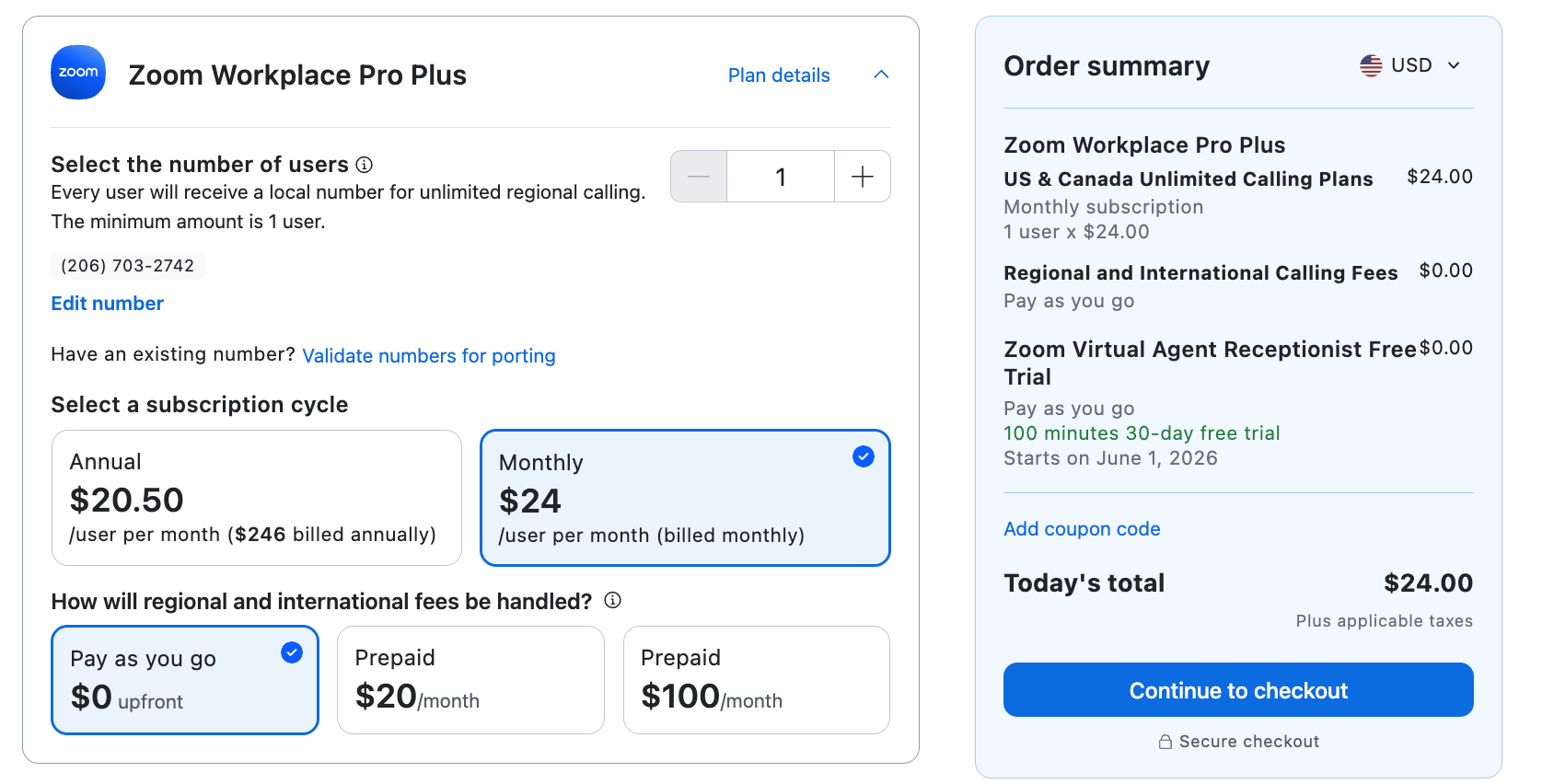
The Pro Plus bundle is the standard entry point for growing teams that want unified software automation without moving to complex enterprise licensing contracts. Billed annually at $20.50 per user per month (or $24 month-to-month), it effectively bridges the gap between basic business telephony and a comprehensive productivity suite.
The integrated AI Companion automatically handles real-time call note-taking and voice recording transcriptions, turning standard phone conversations into actionable task checklists inside your dashboard. You also receive 10GB of secure cloud storage for your recorded files and ongoing workspace data.
5) Workplace Business Plus
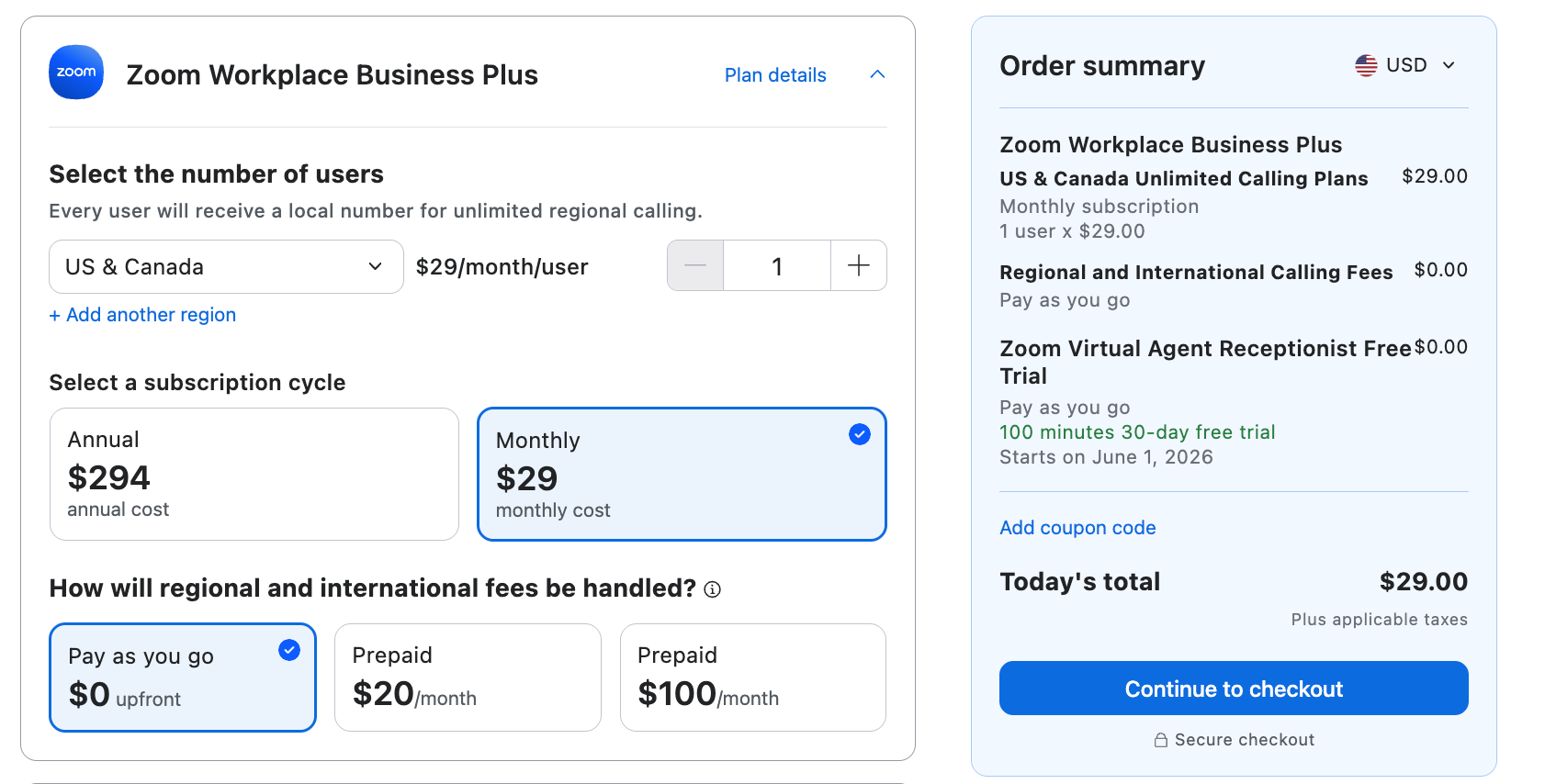
At $24.50 per user, per month (or $29 month-to-month), the Business Plus plan is engineered specifically for larger business needs, accommodating organizations scaling up to 250 users. It lifts meeting attendee maximums up to 300 participants per session and introduces mandatory enterprise tools like Single Sign-On (SSO) security.
This plan tier is where native automation support for CRM platforms like Salesforce becomes active, allowing your sales agents to streamline data entry and sync call logs instantly. It also unlocks deeper integrations with collaborative systems to keep your entire workplace securely connected.
Zoom Phone Add-ons & Hidden Costs
Zoom uses a modular pricing strategy, meaning your base subscription rate is just the starting point of your real net spend. To get a fully featured business setup, you may need to account for these additional monthly operational expenses:
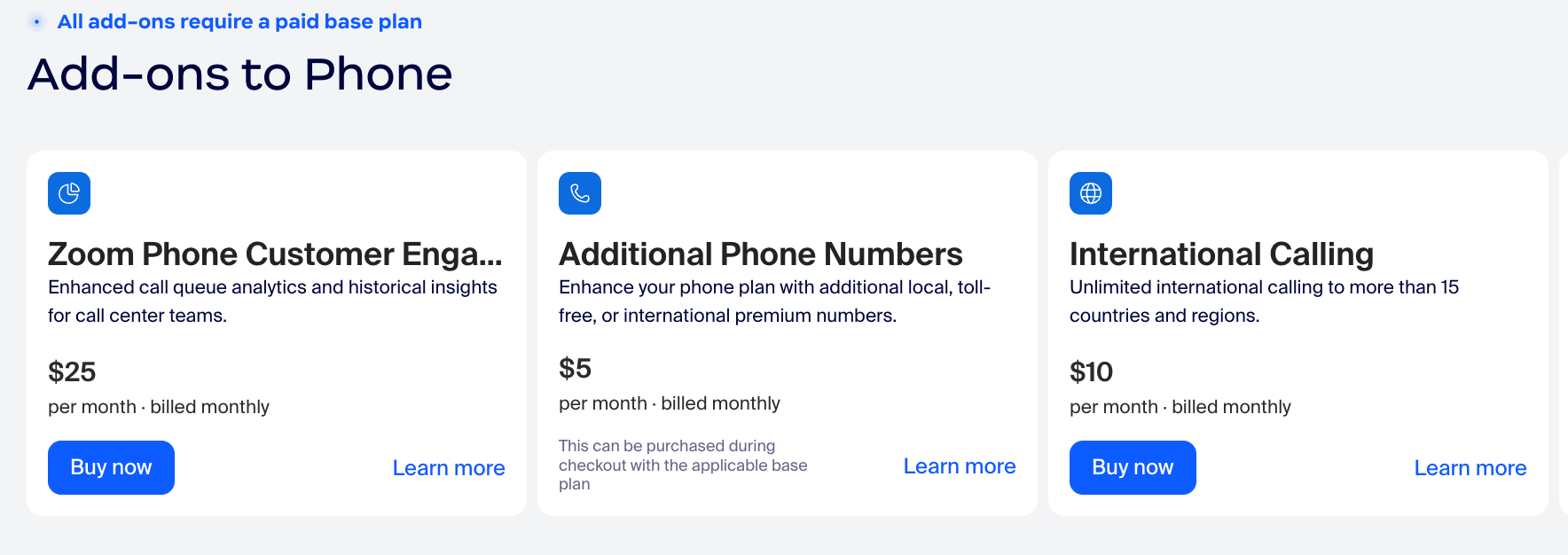
- Zoom Phone Power Pack ($25/user/month): If your team runs a high-volume support environment, this add-on is required to unlock real-time queue analytics, wallboard monitoring widgets, and desktop receptionist consoles.
- Additional phone numbers ($5/month per number): While each user license contains one direct phone path, provisioning extra localized lines or dedicated department trunks increases your monthly bill.
- Taxes and telecom fees: VoIP platforms are subject to local, state, and federal utility assessments (such as the Federal Universal Service Fund). These administrative and regulatory adjustments can add 15% to 25% to your base pricing, depending on your physical location.

What Users Say About Zoom Phone Pricing
The consensus from users is that Zoom Phone is a no-brainer for companies already locked into the Zoom ecosystem, but it receives mixed marks from power users and high-volume call center teams.
What users like (the pros)
- The unified discount: Users praise the transactional ROI of the Pro Plus and Business Plus bundles. Consolidating video assets, team chats, and a business phone system onto one invoice is routinely 30% to 40% cheaper than managing multiple software vendors.
- Minimal learning curve: Because most employees already understand the core Zoom meeting layout, deployment is fast. Administrators report that they rarely have to spend operational time training staff on how to dial numbers, place holds, or check voicemails.
- Value for money: The AI Companion is a standout favorite. Users appreciate that they don’t have to source a separate automated transcription tool because Zoom builds call summaries straight into their standard plans.
What users dislike (the cons)
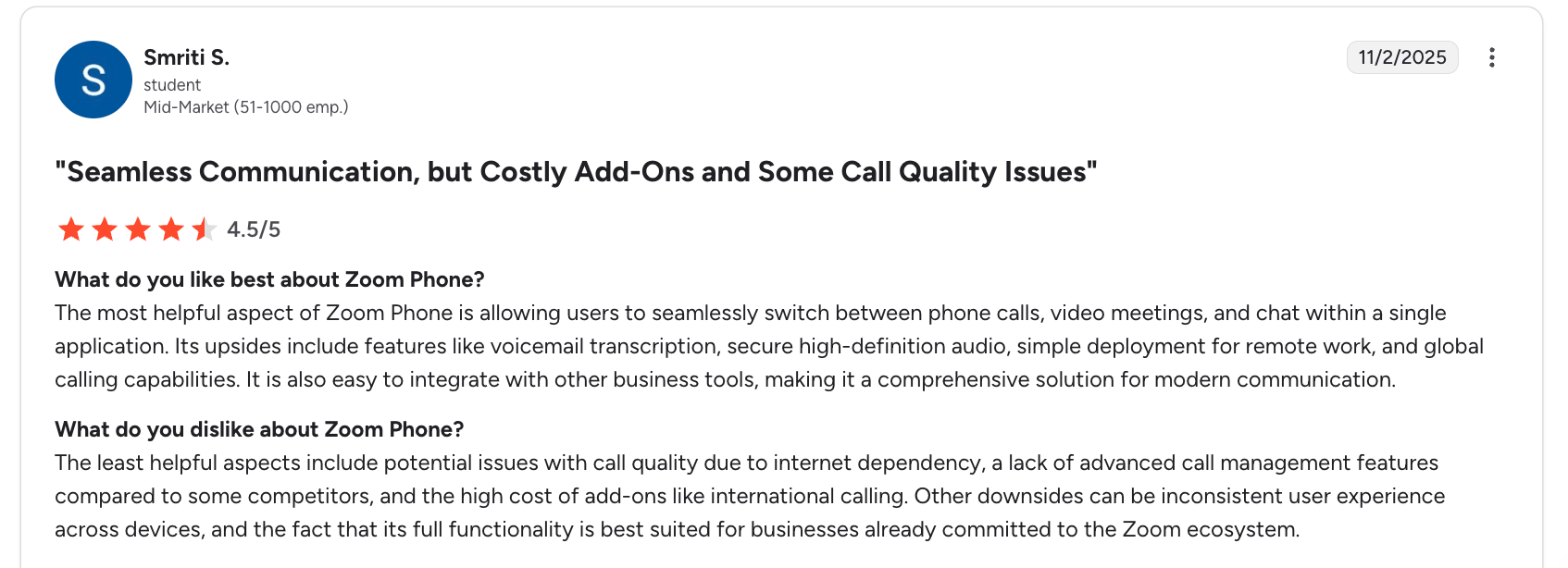
- Costly Add-on accumulation: A coom user observation across community threads notes that while the base entry-level pricing seems inexpensive, once you factor in additional numbers, expanded call recording storage, and the Power Pack tier for live analytics, the actual monthly invoice matches premium platforms.
- Telemetry support speeds: While the baseline software is highly reliable, reviewers on G2 mention that specialized customer service for the complex, telephony-specific side of the platform can be harder to reach compared to video support.
- Advanced CRM Depth: Some reviewers note that while Salesforce synchronization is functional, it acts primarily as a passive call logger rather than a deep, automated workflow engine. If your team requires advanced data syncing loops, users suggest evaluating dedicated voice-first architectures.
Top Zoom Phone Alternatives for 2026
If your business needs run deeper than basic internal video meetings or simple phone extensions, several alternative Unified Communications as a Service (UCaaS) platforms are engineered to solve specialized communication problems.
| Alternative | Best for | Advantage over Zoom Phone |
|---|---|---|
| Nextiva | SMBs looking for 24/7 support and built-in CX tools | Combines solid voice features with advanced contact center infrastructure, managed CRM integrations, and predictive customer sentiment tracking under a single vendor. |
| RingCentral RingEX | All-around UCaaS robustness and legacy migration | Offers the broadest marketplace feature footprint across messaging, voice, video, and over 500 mature software integrations for mid-market environments. |
| Microsoft Teams Phone | Dedicated Microsoft 365-heavy organizations | Seamlessly adds secure PSTN connectivity directly to your existing Teams workplace layout, eliminating separate software vendors. |
| Dialpad Connect | High-volume sales teams and AI-native workflows | Extremely strong baseline AI coaching playbooks, automated speech-to-text transcriptions, and real-time sales agent assist tools included standard. |
| 8×8 Work | Global contact centers and deep international calling | Optimized for complex multi-region global trunks and multilingual deployment support across cross-border offices. |
| Cisco Webex Calling | Large enterprise Cisco and Webex infrastructure environments | Built specifically for enterprise spaces with existing on-premises Cisco networking hardware, hardware desk devices, and high-security compliance matrices. |
Nextiva vs. Zoom Phone Deeper Dive
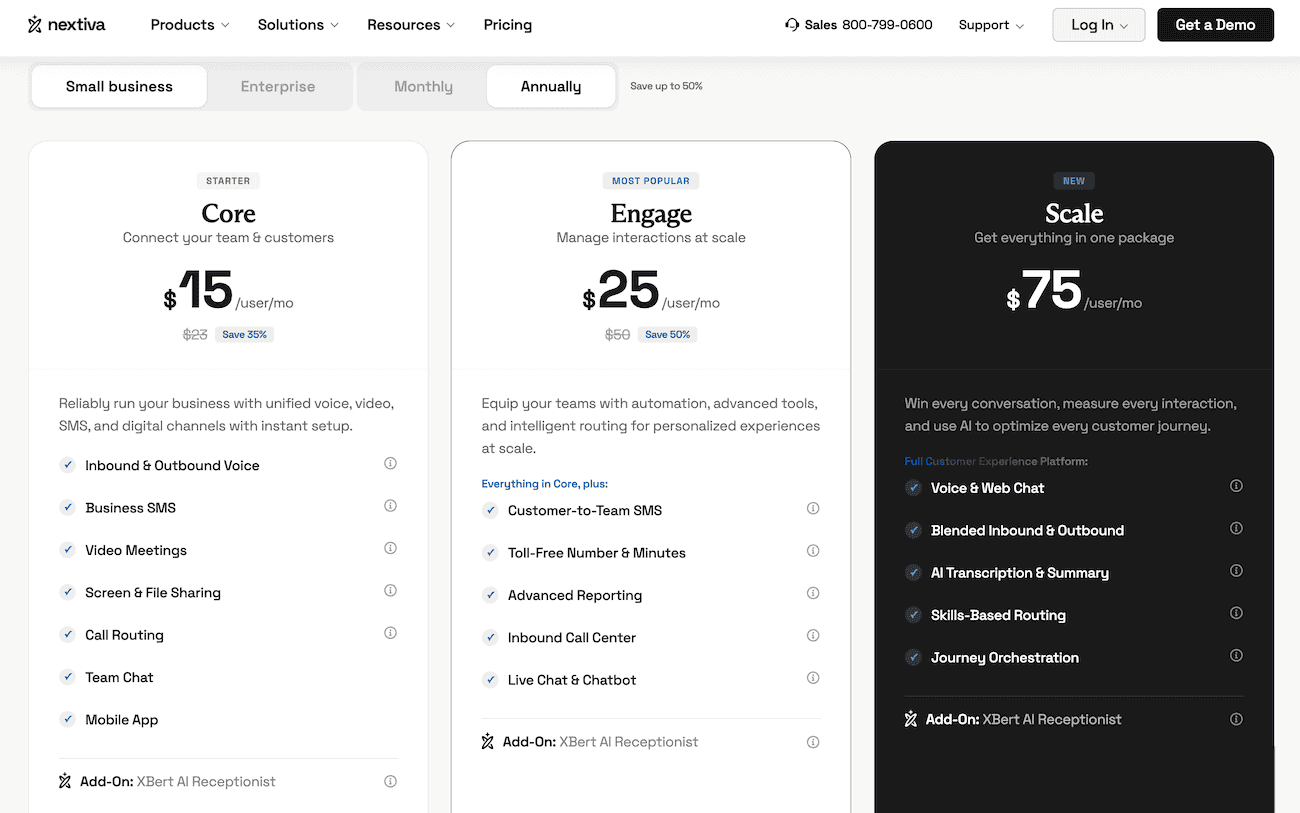
While Zoom approaches communications from a video-first mindset and added a phone dialer down the line, Nextiva was engineered from day one as a voice-first customer experience platform. This difference in their structural makeup changes how each platform handles active business environments.
- Support model: Nextiva offers premium 24/7 phone service support on all plans, whereas Zoom funnels callers toward digital self-help unless they are on a higher tier.
- The contact center gap: If you run a high-volume contact center or call center, Nextiva’s native CRM integrations and sentiment analysis tools outperform Zoom’s add-on modules.
- Pricing transparency: Competitive options like Nextiva include business texting and call recording in their base rates, while Zoom may require a specific pricing plan tier or automation pack to get the same depth.
| Area | Zoom Phone | Nextiva |
|---|---|---|
| Best for | Companies already using the Zoom ecosystem. | Businesses that want stronger customer service and advanced contact center tools. |
| Ease of use | Simple if your team already uses Zoom Meetings daily. | Easy to navigate day-to-day, but more admin-heavy for complex setups. |
| Calling quality | Excellent. | Excellent. |
| Video meetings | Best-in-class integration natively with Zoom Meetings. | Good, but historically not quite at Zoom’s specialized video level. |
| Contact center or CX | Improving fast, but lighter on advanced analytics. | Stronger overall CX and relationship management capabilities. |
| CRM integrations | Good basic logging coverage. | Better all-around breadth and depth of custom workflow automation. |
| Mobile app | Strong mobile app stability. | Good functional mobility options. |
| Pricing framework | Cheaper for baseline voice configurations. | More expensive due to enhanced value and feature-dense standard packages. |
| Analytics or reporting | Good basic diagnostic tools. | Better and more granular for managers and active call centers. |
| Customer support | Mixed user reviews for standalone phone problems. | Stronger, 24/7 in-house support networks. |
| International or global | Strong; scales globally better out of the box. | Good, but relies on specific regional carrier configurations. |
| Setup complexity | Fast deployment and quick setup loops. | Features more advanced and customizable configuration options. |
Where Zoom Phone wins:
It provides a highly streamlined, familiar user interface with a lower starting hardware and software footprint. It’s built for fast deployment and remains a top pick if your workforce already operates completely inside Zoom Meetings.
Where Nextiva wins:
It outpaces simple dialers by providing deeper call analytics, advanced queue tracking tools for managers, a stronger aggregate customer support reputation, and extensive custom configuration routing matrices designed to handle high-stakes external customer interactions.
Why choose Nextiva over Zoom Phone?
Nextiva is explicitly optimized for operations where external customer-facing communication is a primary business focus. Because Nextiva’s standard packages build unlimited virtual faxing, team-based text messaging, and 24/7 support lines directly into their base rates, you avoid the add-on fatigue that teams can experience inside Zoom’s modular layout.
If your team collaborates on customer texts or needs a unified view of customer history (calls, texts, and emails), Nextiva’s unified CX platform offers an all-inclusive framework that video-based tools struggle to match.
Verdict: Is Zoom Phone Right for You?
Zoom Phone pricing offers the highest ROI for teams that already use the Zoom video environment. If your business already pays for premium Zoom Workplace tools, adding voice lines via the Pro Plus bundle is a logical, cost-effective step to consolidate your billing software.
However, if your business is highly customer-facing — such as a medical office requiring immediate compliance loops, a legal firm tracking billable call data, or an active sales agency — the hidden overhead of support tiers and separate feature add-ons can make Zoom more expensive over time. In those cases, the pricing transparency and inclusive feature design of a platform like Nextiva deliver better long-term value.
Paying too much for Zoom?
Ditch the limitations and switch to Nextiva for full-featured business communications and clear pricing.
Zoom Phone Pricing FAQs
Does Zoom Phone offer a free trial?
Yes, Zoom offers a 30-day free trial period for its phone solution. This allows administrators to test outbound network voice quality, evaluate the AI Companion call summary tools, and check portal compatibility on their existing local network before executing a formal annual contract.
Is a Zoom Phone number free?
A single local phone number is included standard with each paid user license. However, if your business requires a separate toll-free line or multiple regional numbers to support different outward-facing departments, you will pay a separate monthly fee starting at $5 per additional number.
Can I use Zoom Phone for HIPAA-compliant communications?
Yes, but compliance is not active or available out of the box on entry plans. To meet legal data safety parameters, you must formally execute a Business Associate Agreement (BAA) with Zoom. This data security routing requires an upgrade to a Workplace Business Plus or Enterprise account tier, increasing your baseline subscription cost to meet mandatory encryption and security standards.
Is the Zoom Virtual Agent Receptionist included in standard Zoom Phone plans?
No. While Zoom’s basic AI Companion (which handles automated post-call summaries, action items, and voicemail prioritization) is included at no additional cost within paid plans, the full voice-driven Virtual Agent Receptionist (AI Receptionist) requires a separate premium add-on license.
Because it runs advanced conversational models to handle end-to-end scheduling and real-time data lookups, it carries significant administrative pricing overhead compared to a standard standalone user seat, but can currently be explored on a free trial. Make sure to check Zoom’s official site for more info trials.
What is the “Click to Cancel” impact on Zoom billing?
A major trending topic is Zoom’s rigid contract structure. While federal “Click to Cancel” rules have made it easier to sign up, users on Reddit and G2 frequently warn that add-ons (like the Power Pack or Webinars) can get locked into the same annual term as your base contract. This means if you add a feature mid-year, you may be unable to remove it until your full account renewal date in 2027.
How do Zoom Phone’s international calling rates work?
If you don’t have the Global Select plan or the $10 International Add-on, you’re billed per minute. Rates vary by country, so it’s best to check Zoom’s real-time rate sheet before making international calls.
The post Zoom Phone Pricing: How Much Does It Really Cost in 2026? appeared first on Nextiva Blog.